SPECIFICATIONS
Battery Included: Yes
Brand Name: beboncool
Certification: CE
Compatible Brand/Model: Nintendo
Compatible Nintendo Model: Nintendo Switch 2
Compatible Platform: Nintendo Switch 2
Feature: Zero Drift, Non-contact Magnetic Sensing, High Precision
Finish Type: Others
Hall Effect: no
High-concerned chemical: none
Interface Type: Type C
Joystick Sensor Module Brand/Type: TMR Joysticks
Model Number: 500
Origin: Mainland China
Package: Yes
Pattern: Monochrome
RGB lighting joysticks: Yes
Sensor Type: TMR Tunnel Magnetoresistance
Trigger Button Type: NONE
Type: Gamepads
All-in-One Grip Controller for Switch 2
Key Features
-
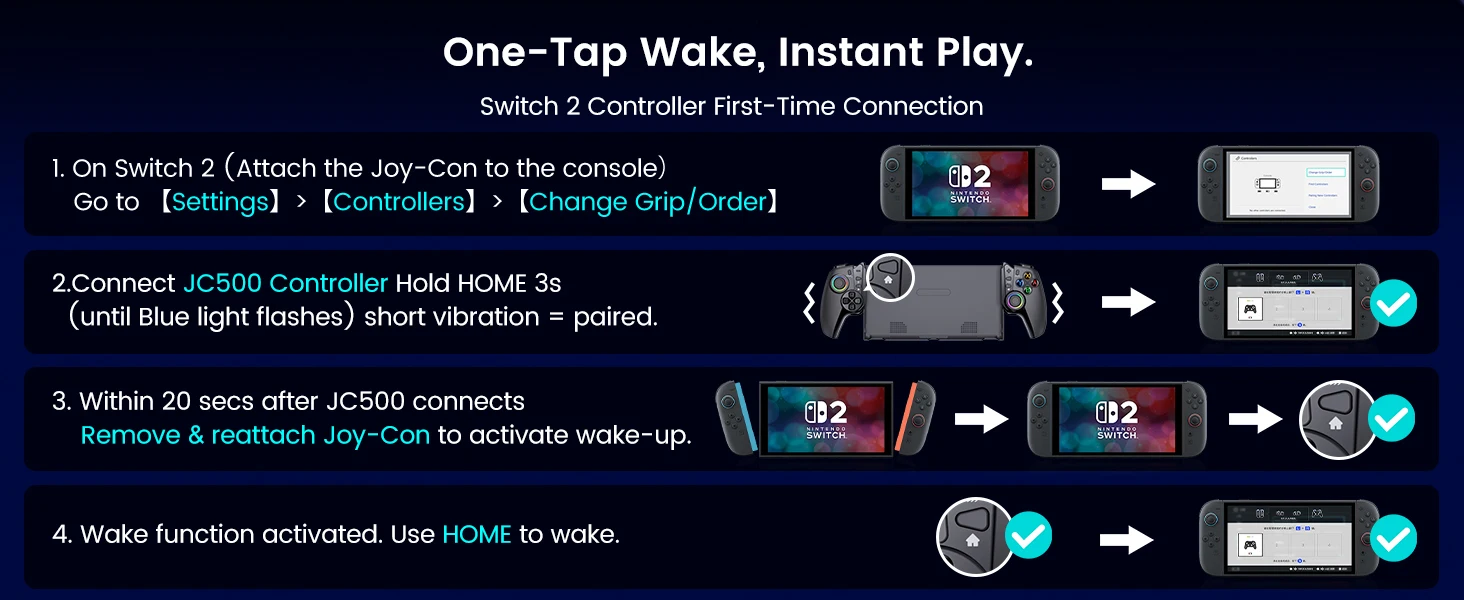
Bluetooth Connection & Wake-Up FunctionThis controller is specially designed for Switch 2 with stable Bluetooth connection.
First-time pairing: Press and hold the HOME button for about 3 seconds until the blue LED flashes rapidly.
Reconnection: Short-press the HOME button for 1 second when the console is on.
-
Wake-up function activation:
Keep the original Jo**Con attached to the console.
Pair the JC500 with the console.
-
Within 20 seconds of successful connection, remove and reattach either Jo**Con.Once activated, short-press the HOME button to wake up the console.
-
Dual-Motor Vibration4 adjustable levels: Off, Low, Medium, High. Short-press the vibration button to cycle through modes.
-
Gyro Motion ControlBuilt-in 6-axis gyro for accurate motion control in supported games.
-
Independent Capture ButtonOne-click screenshot; long press for screen recording.
-
TMR Sticks JoysticksUpgraded TMR sensor delivers far higher precision than ordinary hall effect joysticks. No drift for longer lifespan, no wear, zero dead zone, with smooth and instant response.
-
Turbo FunctionSupports manual and auto turbo with 3 adjustable speeds:4 hits/sec, 8 hits/sec, 16 hits/sec.
Increase speed: Turbo + ↑
Decrease speed: T + ↓
-
Clear all turbo settings: Long press the T button for 5 seconds.Compatible with: A/B/X/Y/LB/ZL/RB/ZR.
Long-Lasting Battery
1000mAh battery
Up to 10 hours of gameplay
Type‑C charging, fully charged in about 3 hours
-
Charging indicators:
Power on: Right blue LED flashes slowly; stays on when full.
Power off: Right blue LED flashes slowly; turns off when full.
-
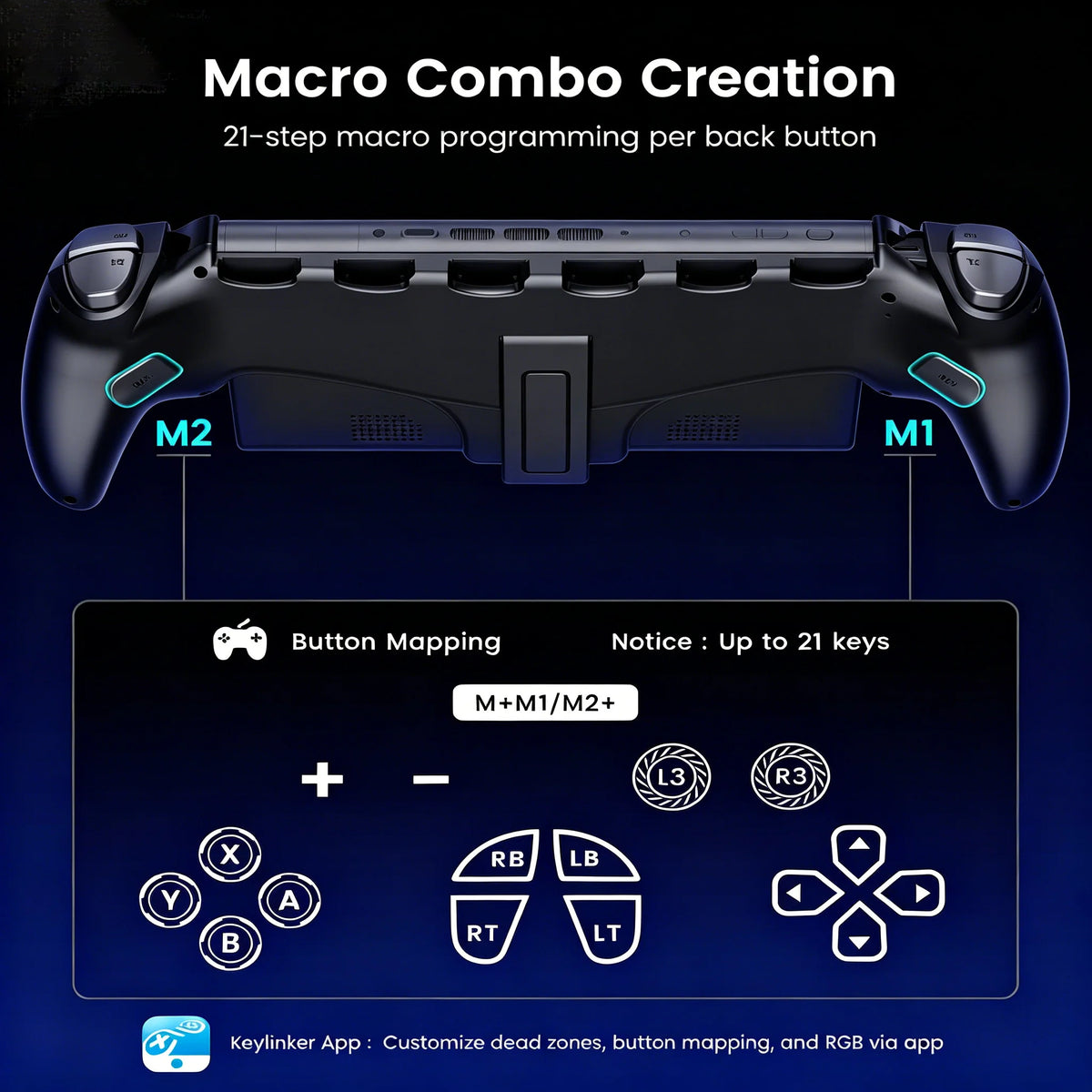
Programmable Back Buttons (M1/M2)Each back button supports up to 21 programmable keys, including:A/B/X/Y/LB/ZL/RB/ZR/L3/R3/‑/+/D‑pad.
Enter programming: Press M + M1/M2 for 2 seconds until the joystick light flashes white. Press the desired buttons, then confirm with M1/M2.
Clear all macros: Long press M for 5 seconds (red flash 3 times).
Clear single macro: Double-click the corresponding back button in programming mode.
-
RGB Joystick LightsMultiple lighting modes:Fast RGB → RGB Fade → Slow RGB → Single Color Fade → Cyan&Orange → Pink → Cyan → Green → Blue → Purple → Orange.5 brightness levels (10%–100%):
Brighter: ↑ + RGB
Dimmer: ↓ + RGB
-
6 Game Card SlotsBuilt-in slots on the back hold 6 game cards securely.
-
Secure Lock DesignElastic locks on both bottom sides automatically grip the console to prevent slipping.
-
Adjustable Back StandSupports the console on a table for comfortable viewing and gaming.
-
Multi-Area Cooling VentsFour ventilation zones for effective heat dissipation.
-
Precise CutoutsReserved charging port and side openings for easy charging and console removal.
-
AccessoriesIncludes a 1.5m USB to Type‑C charging cable.
-
Keylinker APP SupportConnect via Bluetooth (device name: JC500) to remap buttons, adjust joystick dead zone, vibration, and update firmware.
-
Ergonomic Comfort GripLarge, full-hand grip design reduces fatigue during long handheld sessions.
-
Protective Case FunctionWraps the console for daily scratch and drop protection.
- NoteThis controller does NOT support NFC functionality.
Q : Can I charge my Switch 2 while using this controller?
A :Yes! The bottom charging port is accessible, so you can charge your Switch 2 while playing.
Q :Does it have NFC for Amiibo? Does this work with Switch 1?
A :No, this controller does not support NFC/Amiibo functionality. No, the JC500 is designed specifically for the Nintendo Switch 2.
Q : is it dockable with the Switch 2 dock?
A :No, you need to remove the controller to dock your Switch 2.
Q :Why won't my Switch 2 wake up when I press the HOME button?
A :The "wake" function must be manually activated. Please follow the setup guide for activation.
Q :Can I use it as a standalone wireless controller?
A :Yes, it connects via Bluetooth and can be used separately from the grip, similar to a Pro Controller.