Skip to product information

HOT PRODUCT | LOW STOCK

Enet Wifi Adapter for BMW F/G/I Series Mini Toyota Supra A90-Wireless OBD2 Diagnostic Cable for BimmerCode BootMod3 XDelete MHD

Enet Wifi Adapter for BMW F/G/I Series Mini Toyota Supra A90-Wireless OBD2 Diagnostic Cable for BimmerCode BootMod3 XDelete MHD

Regular price $1,600.00
Regular price $0.00 Sale price $1,600.00
Sold out
Color

local_shipping ORDER NOW AND RECEIVE IN 7-21 DAYS

View full details


SPECIFICATIONS

12V DC (Directly from OBD port): 12V DC (Directly from OBD port)

Brand Name: SMART BIMMER

Choice: yes

Communication Interface: OBD-II,Ethernet

Compatible Software: BimmerCode, BootMod3, xDelete, MHD, BimmerLink, Bimmer Utility, ISTA, ESYS, INPA

Display Size: Others

Electronic: No

External Testing Certification: FCC

High-concerned chemical: none

Important Note: Does NOT support BMW E Series models. Software is not included and must be downloaded separately.

Interface: OBD-II 16-pin, WiFi, Ethernet Port

Is Batteries Included: no

Item Height: 2.6

Item Length: 9

Item Weight: 0.06

Item Width: 4.5

Key Feature: Supports both Wireless WiFi and Wired Ethernet connection; Stable connection for coding and flashing

Main Functions: Wireless Coding, ECU Flashing, Fault Code Reading/Clearing, Live Data Streaming, Battery Registration, Feature Activation

Measurement Accuracy: ±0.3%

Number of Items: 1

Origin: Mainland China

Software Update: no

Supported Vehicles: BMW F/G/I Series (2004-2025), Mini Cooper, Toyota Supra A90/A91

Use: Not Telecommunication

Voltage: 12V

Wireless Standard: IEEE 802.11 b/g/n, 2.4GHz WiFi

Wireless Support: Wifi

for Material: ABS, Electronic Components

for Model Name: ENET WiFi OBD2 Adapter

X-OBD ENET WiFi Adapter: The Ultimate Wireless Coding & Diagnostic Tool for BMW & Mini


Unlock the full potential of your BMW, Mini, or Toyota Supra with the X-OBD ENET WiFi Adapter. This professional-grade tool replaces cumbersome cables with a stable, high-speed wireless connection, allowing you to perform advanced coding, ECU flashing, and diagnostics right from your smartphone, tablet, or laptop.

Whether you're a professional tuner or a DIY enthusiast, our adapter provides seamless compatibility with the most popular automotive software.

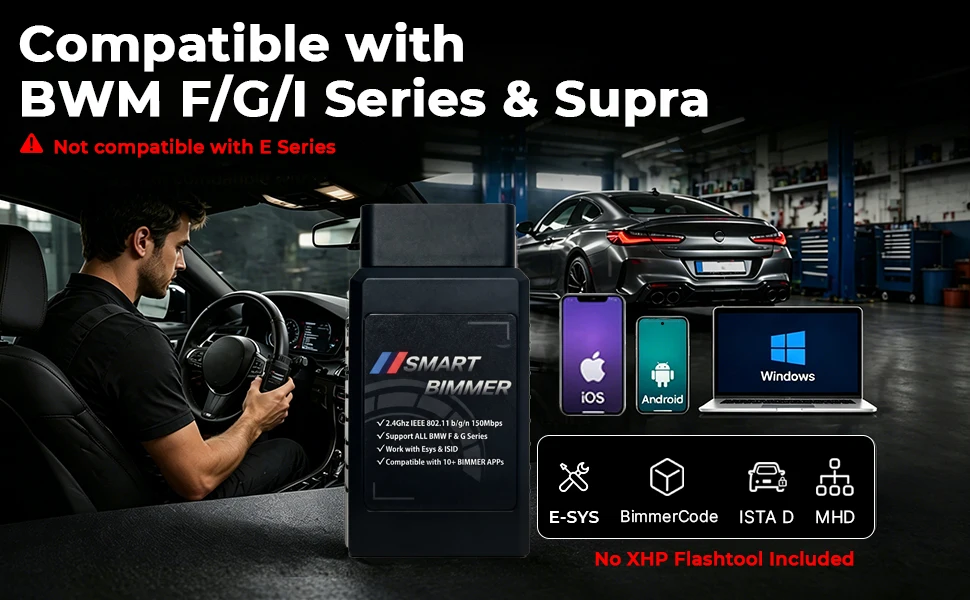
         Easy Plug & Play Setup – It is compatible with E-SYS,BimmerCode, Bootmod3, ISTA D, MHD, XDelete, THOR-the M Flasher, BimmerGeeks Pro-Tool and more, but NOT compatible with xHP Flashtool.
🚀 Why Choose the X-OBD ENET WiFi Adapter?
  • True Wireless Freedom: Say goodbye to messy cables. Connect to your vehicle's ECU via a stable 2.4GHz WiFi connection for a clean and efficient workflow.

  • Dual Connection Modes: Features both WiFi and a standard Ethernet port. Use WiFi for wireless convenience or connect an Ethernet cable (not included) for a wired connection, especially useful for iOS devices.

  • Broad Software Compatibility: Works flawlessly with a wide range of applications for coding, tuning, and diagnostics.

  • Extensive Vehicle Coverage: Supports a vast array of BMW F, G, and I series models, Mini Coopers, and the Toyota Supra A90/A91.

  • Plug and Play: Draws power directly from the OBD-II port. No external battery or power source is needed.


🚗 Wide Vehicle Compatibility
Compatible with BMW F Series Chassis:
  • Sedan/Coupe: 3 Series (F30, F35, F34), 5 Series (F10, F07, F18), 6 Series (F06, F12, F13), 7 Series (F01, F02)

  • SUV/SAV: X1 (F48), X3 (F25), X5 (F15), X6 (F16)

  • M Series: M3 (F80), M4 (F82/F83), M5 (F10), M6 (F12/F13)

Compatible with BMW G Series Chassis:
  • Sedan/Coupe: 3 Series (G20, G28), 5 Series (G30, G38), 7 Series (G70, G71), i5 (G60)

  • SUV/SAV: X3 (G01), X5 (G05), X6 (G06), X7 (G07)

  • M Series & EV: M3 (G80), M4 (G82/G83), M5 (G90), X5 M (F95), i4 (G26), iX3 (G08), iX (I20)

Compatible with BMW I Series & Others:
  • Electric: i3 (I01), i7 (G70/I70)

  • Mini: All Mini Cooper models

  • Toyota: Supra A90 / A91

⚠️ Important: This adapter is NOT compatible with BMW E Series models.
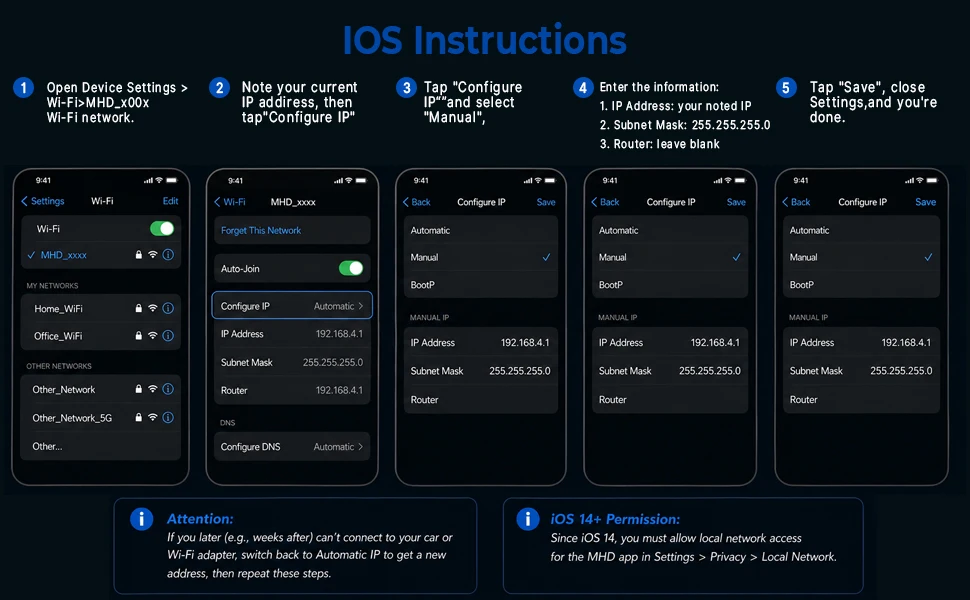
🛠️ How to Connect
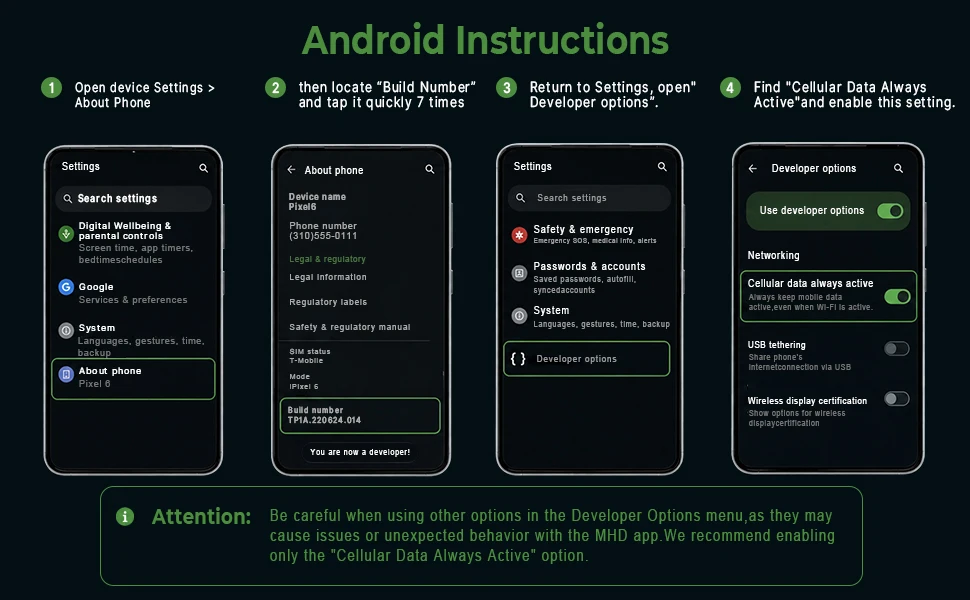
For WiFi Connection (Android & iOS):
  1. Plug the adapter into your vehicle's OBD-II port.

  2. On your phone/tablet, go to WiFi settings and connect to the network named ENET_WIFI_xxx.

  3. Password: 12345678

  4. (For some Android devices): You may need to set a Static IP.
    • IP Address: 192.168.16.107

    • Gateway: 0.0.0.0

    • Subnet Mask: 255.255.0.0

  5. Open your diagnostic app (e.g., BimmerCode, BootMod3) and it should automatically detect your vehicle's VIN.

For Ethernet Cable Connection (iOS & Android):
  1. Connect the adapter to your device using a Lightning-to-Ethernet or USB-C-to-Ethernet adapter.

  2. The connection is usually automatic. For some iOS devices, you may need to set a manual IP in settings:
    • IP Address: 169.254.250.250

    • Subnet Mask: 255.255.0.0

  3. Launch your app to begin.

📦 Package Includes
  • 1x X-OBD ENET WiFi Adapter